Friday, April 19, 2013

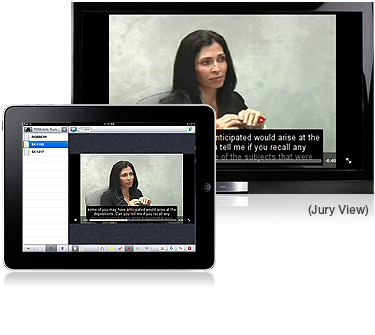
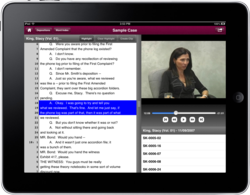
inData Releases DepoView for iPad

NEW IPAD APP LETS ATTORNEYS REVIEW VIDEO DEPOSITIONS AND MAKE CLIPS VIRTUALLY ANYWHERE.
DepoView for iPad
Legal professionals are more mobile than ever and it is no longer feasible to prepare for trial only in the office. DepoView for iPad gives attorneys the flexibility to review and prep depositions anytime and anywhere. 
Gilbert, Arizona (PRWEB) March 12, 2013

inData Corporation, a software developer for litigation professionals, announced the highly-anticipated release of an iPad version of DepoView, its popular deposition review and clip making software.

DepoView for iPad joins the stage as the latest tool to help mobile legal professionals create compelling trial presentations from virtually anywhere. Whether on a plane, in a cab or at home, this new iPad app allows attorneys to easily review complete depositions or instantly navigate to key discussions with a word index. A simple highlighter feature allows users to create single segment or multi-segment clips and then share them with the click of a button. And for added flexibility and ease, users can choose to email the clips as either a standard .mp4 video file or as a .ccs file, ready for import into TrialDirector® for final annotation, review and presentation in trial. It's mobile and it's easy!

For a complete list of features, visit the App Store where it can also be downloaded free of charge.

"Attorneys now have another convenient way to use their iPad to save time and increase productivity as they prepare for trial,” said Derek Miller, CEO and President of inData Corporation. “Further, the widespread use of Timecoder Pro by videographers also means that virtually any vendor can easily provide depositions in the DepoView format for on-the-go review.”

For more information about inData's products and services, including TrialDirector, visithttp://www.indatacorp.com or call 800-828-8292.

Tuesday, October 23, 2012


New Tool in the Toolkit


SMART Podium 500
One of the new tools that we have added to our trial toolkit and in our Mock Courtroom/Training facility is the SMART Podium 500.  The SMART Podium is an interactive display that provides the functionality of a SMART Board in an 18” or 24” monitor.  It uses a pen instead of your finger or mouse to interact with content.  One of the reasons I like the pen instead of the touch screen is the ability to rest your hand/arm on the display and not have to worry about the display getting confused with new and unexpected sources of input.  It comes with a gas spring stand that is easy to adjust and adapt to your liking. 


To add the Podium into your Courtroom configuration, you can use the Video In and Video Out interface to pass the signal through the display.  The Video In source comes from your laptop/computer and the Video Out source then plugs into the rest of the Courtroom video distribution or projector.  If you don’t have a DVI output on your laptop, make sure you have DVI-to-VGA adapters with you as the input/output connections on the Podium are DVI-I.  You will also need to attach a USB cable from your laptop/computer to the Podium.  I highly recommend getting the SMART GoWire autolaunch cable.  It is a USB cable with the SMART Meeting Pro software included on the cable and you kill two birds with one stone/cable.  A major benefit of the GoWire is that you can switch laptops or use someone else’s computer and you don’t have to install any software – it’s in the cable.   To use the podium with all of the SMART Board tools, you need to make sure that you have their Meeting Pro software installed. 
   
TrialDirector has been integrated to work with the Podium incorporating the same features and functionality as the interactive whiteboards.  Use the Presentation Preferences inTrialDirector to set the tool options for the pen color buttons that are on the top portion of the Podium.  The pen connected to the Podium becomes your mouse and makes zooming, highlighting etc. with TrialDirector easy.  It is an ideal piece of equipment to include as part of your toolkit, especially if the Attorney wants to run the presentation from the lectern in the Courtroom.  Add in a USB amplifier to extend the cable and some longer VGA cables, customize the toolbar and you are good to go.

Sometime within the next year, SMART will be offering a touch version of the SMART Podium.  For now, the 18” or the 24” monitors are much easier to ship or transport to your nearest Courtroom and much easier to find a place to put it.  If you are interested in the specs/pricing or want to order one, contact Judy Miller atjudymiller@smartcourtconsulting.com


Tuesday, April 17, 2012


Why Use Visual Aids in the Courtroom? ...the answer is common sense.


We navigate our daily life through the use of visuals. We have been conditioned to use visuals to inform us and entertain us. Advertisers have been using visuals to tell us information for hundreds of years. 


To not use visuals in the courtroom would be a mistake

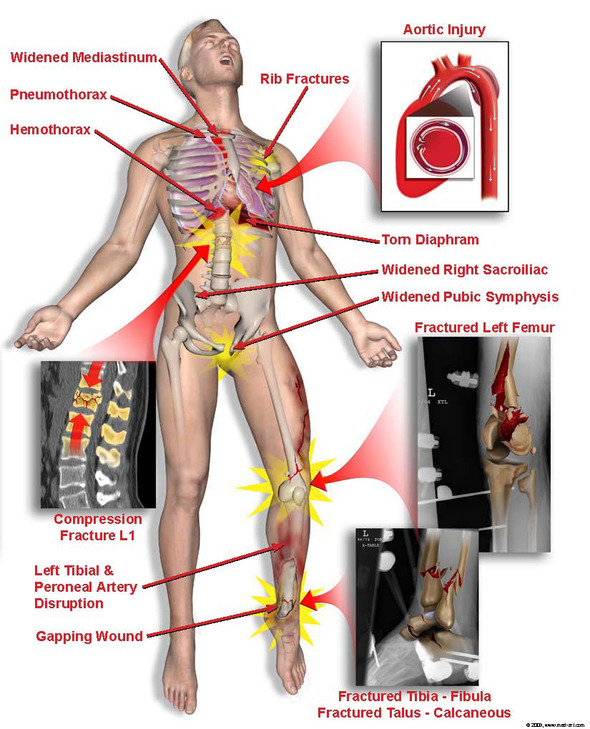
Don't tell the jury about your clients' injuries ...show them. A quality illustration can make the audience feel the plaintiff's pain.

Let Med Art & Legal Graphics help you tell your story ...a story the jury will understand, empathize with and most importantly they will remember it in the deliberation room.

Call/Email to get more information about
Med Art & Legal Graphics
ShelleyWatts@med-art.com 
888-715-0784
LorrieThomason@med-art.com 
770-891-3103

www.med-art.com

Monday, February 13, 2012

Trial Director for IPAD!!!!

Product Packaging

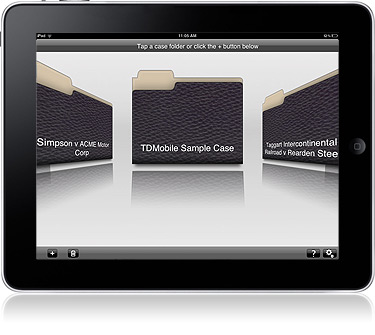
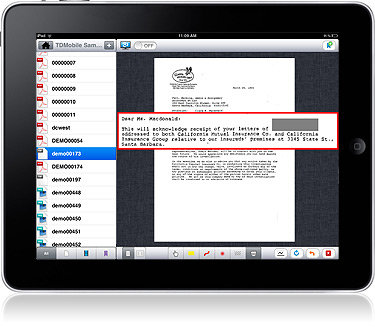
TDMobile is a simple, easy to use evidence management and presentation tool designed specifically for use with the iPad. With TDMobile, you can create a case folder, add exhibits to your case through a Dropbox™ or iTunes® account and interact with your evidence using the annotation and presentation tools. Or... prepare complex exhibits in TrialDirector and export to TDMobile for presentation.


TrialDirector for the iPad
  • Case Management on the Go!
    Manage multiple case folders
    Create new case folders right on the device
    Import entire folders from Dropbox with folder structure intact
    Import files one at a time from Dropbox
    Export a workbook from TrialDirector specifically for use with TDMobile.  
         
Annotation Features

  • TDMobile gives TrialDirector users their favorite annotation and markup tools including:
  • Callout Tool - Use multiple callouts from different pages. Callouts can be zoomed, rotated, and placed anywhere on the screen.
  • Pen Tool - Multiple colors supported
  • Highlight tool - Bright and fully transparent Redaction tool
  • Laser Pointer tool
  • Whiteboard tool


Video Playback

Export your video from TrialDirector with embedded closed caption to an MPEG-4 format. TDMobile supported formats include industry standards such as:
  • H.264 video up to 1080p
  • MPEG-4
  • Motion JPEG (M-JPEG)
Other Features

TDMobile also has the ability to freeze output on an external display while you prepare a different exhibit on the iPad. Zoom and Rotate your exhibits with normal iPad touch gestures.

Monday, July 18, 2011

Judge declares mistrial in Roger Clemens perjury case


....this is why you ALWAYS want to be working with a professional trial consultant.

The judge in the Roger Clemens federal perjury trial abruptly declared a mistrial on the second day of testimony after the government inadvertently allowed the jury to hear statements from a U.S. congressman discussing the credibility of one of the key witnesses against the former All-Star baseball pitcher.

U.S. District Judge Reggie Walton was livid Thursday that a video screen was left on in the courtroom while he and the lawyers privately discussed an issue away from the jury, and yet the jurors could clearly see written comments by U.S. Rep. Elijah E. Cummings (D-Md.) during a 2008 House hearing in which Clemens testified he never used steroids or other enhancement drugs.

"Sadly, I have reached this conclusion," Walton said.

At issue was an earlier ruling in which the judge said he would not allow outside testimony or evidence from others about the credibility of certain key witnesses, including Andy Pettitte, a former teammate of Clemens.

Yet appearing on the screen was a transcript of comments by Cummings discussing Pettitte's wife and Pettitte's credibility as one of the lead government witnesses against the seven-time Cy Young award winner.

The government was supposed to have redacted such comments, and was instructed to keep them away from the jury of 10 women and two men so as not to prejudice their deliberations.

"We'll never know what impact that will have on how this jury decides this case, when we have a man's liberty's at stake," said Walton, visibly angry. "I am troubled by this. The government should have been more cautious."

He added, "I don't see how I unring the bell" and keep the jury from considering what Pettitte's wife said and what Cummings thought of it.

"In my view, Mr. Pettitte's testimony is going to be critical as to whether this man goes to prison, and I can't in good faith leave this case where a man's liberty is at risk when the government should have assured we are not in this situation."

Prosecutors said the error was inadvertent. But Rusty Hardin of Houston, Clemens' chief defense attorney, seized on the problem and immediately asked for a mistrial.

"I like this jury," he said. "But…"

On the screen were written comments from Cummings discussing how Laura Pettitte has said her husband "told me he had a conversation with Roger Clemens and Roger admitted to him using human growth hormones." Clemens has insisted he never told Pettitte that he used HGH or steroids, even though his friend and former New York Yankees teammate has said otherwise.

Yet Cummings, from his comments, seemed to believe Pettitte over Clemens.

Cummings' comments were then addressed to Clemens, and his sworn statements that he never told Pettitte he used the drugs.

"If that were true," Cummings' comments continued on the video, "why would Laura Pettitte remember her husband telling her about that?"

Clemens had been charged with perjury, obstruction of justice and making false statements in the latest criminal trial dealing with Major League Baseballplayers and steroids and other enhancement drugs.

Before ending the trial, the judge left the bench to confer about what to do. But he severely admonished the prosecutors.

"Government counsel doesn't do just what government counsel can get away with doing," he said. "And a first-year law student knows you can't alter the credibility of one witness with clearly inadmissible evidence."

A chagrined judge then dismissed the jury.

"Ladies and gentlemen," he told jurors, "we have taken about a week out of your life. We expended a lot of your taxpayers money to reach this point. Unfortunately there are rules we play by and those rules are designed to insure that both parties receive a fair trial."

The judge continued a gag order precluding Clemens and attorneys and prosecutors discussing the case -- at least until a hearing on Sept. 2 to decide how or whether to jump start the case.

As he left the courtroom, Hardin said, "I would have liked to have gone forward. But we just didn't have a choice."

Richard.serrano@latimes.com

Tuesday, March 09, 2010

Don't Take a Chance: Hire a Pro to Do Your Trial Presentation


Debunking the Myths of Litigation Exhibits & Presentations
I recently attended a legal conference where I discussed the services of our company – Med Art & Legal Graphics – with attorneys from across the country. It was good to see many old friends who have used our demonstrative evidence exhibits & trial presentations with much success. Still, I ran into a fair number who said, “I don’t use that kind of stuff.”
Granted, not all cases require exhibits. However, I feel I should address some…um…myths (for lack of a better term) I have heard from attorneys regarding the use of “that kind of stuff.”
This is the third in a 5-part series of the most common myths regarding the use of demonstrative exhibits and litigation presentation tools.

MYTH 3: Graphic exhibits won’t be admissible.

When exhibits are prepared by Certified Medical Illustrators, then reviewed and approved by the treating physician or other expert to be true, fair and accurate, they are always accepted into evidence.

A skilled attorney will have her/his exhibits prepared by a professional – like Med Art & Legal Graphics -- who works with experts to get the necessary approval every step of the way. This applies equally to crime scene exhibits, accident orientation depictions and all other illustrative mediums.

For those of you DIY folks, take note of what Ed Josiah of GREYHAWK North America has to say in his treatise, “Demonstrative Evidence Evidentiary Issues & Laying a Proper Foundation:”

“When casually measured and hastily prepared diagrams are used to pinpoint specific placement of crucial evidence, or to verify eyewitness visibility, they step over the boundary of their original intent and may create a false picture of the evidence.”

Don’t risk exhibit inadmissibility: Contact the professionals at Med Art & Legal Graphics Company – 888-715-0784. Or, visit our website at www.med-art.com.

Note: For statutory guidelines, see Federal Rules of Evidence 901, 902, and 1001-1004.evidence.